Stop Babysitting Your Coding Agents
Stay informed. Answer when they ask. Steer when needed. Keep the work moving from the conversation.
/steer use the existing parser — no new dependency.

Babysitting is the loop you fall into.
A coding agent keeps working. You keep checking. You answer a question, redirect a wrong turn, and decide what comes next — then the loop repeats. That repeated checking, answering, redirecting, and planning is babysitting.
Babysitting a coding agent means repeatedly checking, answering, redirecting, or planning work just to keep the agent-driven workflow moving.
What is the agent doing right now — and is the direction still right?
Answer a question, grant a permission, or clarify the request when the agent asks.
Stop a wrong turn or steer a new direction when the work drifts.
Queue the next instruction, switch project, switch agent, or hand the work off.
The conversation itself is the status surface.
NightMe does not give you another dashboard to watch. The agent’s state travels with the conversation — through IM message state, heartbeat / activity signals, and reaction emoji. You glance at the chat, you know what is happening.
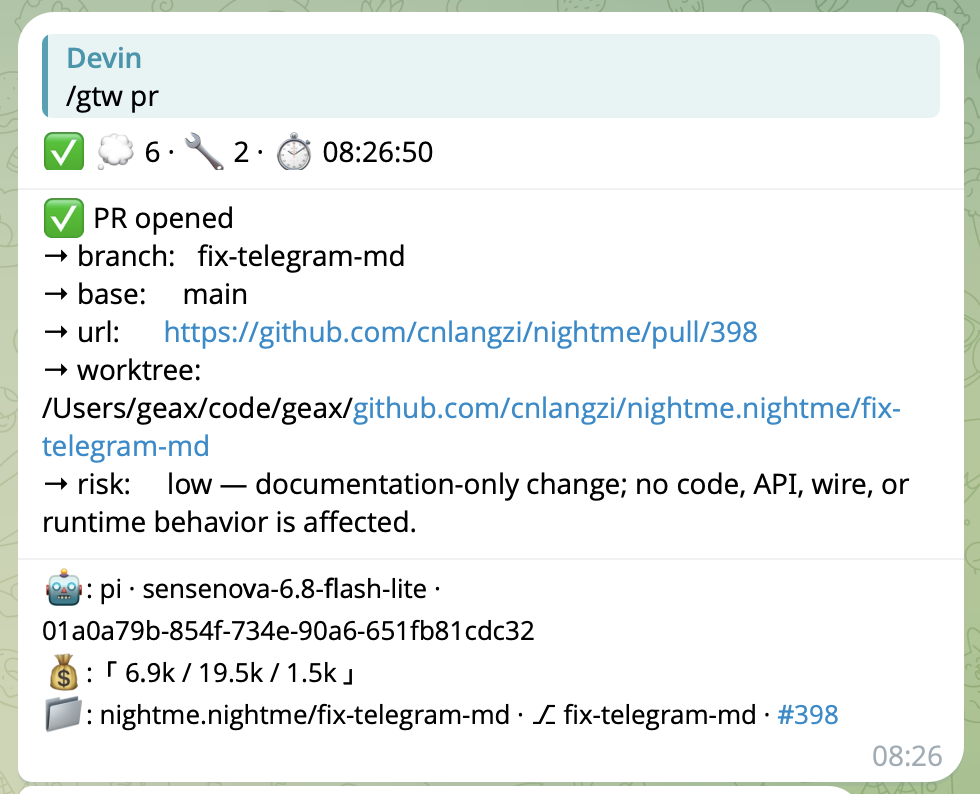
Same status surface, real channel: reaction counts (cloud 6, wrench 2), the 08:26 timestamp, and the full /gtw pr output — PR, branch, base, URL, worktree, risk, agent, model, tokens — delivered to a developer’s phone.
Four phases, one conversation.
Every phase of the loop happens inside the same chat. A few short commands cover the cases where you actually need to intervene; everything else is the conversation reacting to what the agent is doing.
Read the state signals.
The statusbar on each bot message carries agent, tokens, git, and cwd. Reactions and message state tell you whether the agent is working, waiting, or done. You decide whether to keep moving or look closer.
Answer in the chat.
When the agent asks, reply in the same conversation. Permission prompts, clarifications, and follow-ups reach you where you already are — one reply, then it keeps going.
Step in when the direction changes.
If the work drifts, /stop cancels the current step and parks the session. /steer <message> appends a new instruction to the agent’s queue — the current step finishes, the new one runs next. Sending any new message after a stop automatically resumes the session.
What is next.
Queue the next instruction with /steer, switch project with /cwd <path>, or switch agent with /use <agent>. The conversation stays open; the context changes underneath.
/steer skip the new dep, reuse the existing parser
/gtw pr ship this branch as a PR
Conversations map naturally to projects and work.
Each conversation owns one project and one agent session. Switch by sending a message in a different chat — not by juggling terminal windows.
Three chats, three agents, three projects — the same NightMe workflow. See the parallel walkthrough →
Use the chat experience you already know.
NightMe connects to supported IM apps and routes every message to the local coding agent already running on your machine. Two non-lock-in properties: your agent can change, and you do not need a new communication app.
The agent does the work. NightMe keeps the human-agent loop within reach.
Stepping away is a side effect of the same workflow.
Commuting, in a meeting, on another machine — these are not the point. They fall out of the workflow naturally once the conversation itself is the control plane. NightMe does not schedule the work, decide when it runs, or guarantee overnight completion; the underlying local agent keeps doing what it already does, and you stay informed through the chat.
The agent keeps working. You remain connected without babysitting it.
The agent does the work. NightMe keeps you connected to it.
NightMe doesn’t replace your coding agent. It connects the coding agent already running on your machine to the chat experience you already use.
-
1Proactive conversation-based status signals
IM message state, heartbeat / activity, and reaction emoji — so the conversation tells you what the agent is doing without polling the terminal.
-
2Familiar IM interaction
Reply in the chat you already use. No new proprietary app to learn or migrate to.
-
3Direct human intervention when needed
Answer, redirect, or stop — the conversation is the control plane, and step-in is one message away.
-
4Agent-agnostic, workflow stays the same
Switch agents without changing how you work. The conversation and control layer do not move when the underlying agent does.
-
5Consistent workflow across projects and threads
One workflow across conversations, projects, and agents — so switching context is a message, not a tab shuffle.
Frequently asked
Can I run a coding agent while I sleep?
The underlying local coding agent performs the long-running work — NightMe keeps you connected and informed through the conversation. NightMe does not schedule overnight work or guarantee unattended completion; the agent’s own long-running behavior is what does that.
What does “babysitting” a coding agent mean?
Repeatedly checking, answering, redirecting, and planning work just to keep the agent-driven workflow moving. It is the loop of Observe → Respond → Direct → Continue that a developer falls into when the agent has no way to communicate state back.
How do I know when my coding agent needs me?
Through proactive IM message state, heartbeat / activity signals, and reaction emoji on the conversation itself. The statusbar on each bot message surfaces agent, tokens, git, and cwd — so you do not have to keep opening a terminal to check.
Do I need a separate app to monitor a coding agent?
No. NightMe uses supported familiar chat apps rather than requiring a dedicated NightMe communication app. The agent works on your machine; the conversation in your chat app is the monitor.
Can I use different coding agents for different tasks?
Yes — you can switch between any supported coding agent from the same conversation. NightMe is intentionally agent-agnostic and does not rank vendors; the point is that your workflow stays the same regardless of which agent is running.
Does NightMe run the coding agent itself?
No. The local coding agent remains responsible for execution — reasoning, tools, sessions, permissions, and whatever autonomous or long-running behavior it already supports. NightMe provides the conversation and control layer around it.
Your agents can change. Your workflow can stay the same.
Keep every project and session close at hand, and stay in the conversation wherever you are — no matter which coding agent is doing the work.